MoreLogin proxy with LightningBytes
Integrate LightningBytes proxies with MoreLogin in minutes. Use residential and mobile IPs with full HTTP and SOCKS5 support for fast setup and stable performance
What is MoreLogin?
MoreLogin is a robust solution for managing multiple online accounts securely and seamlessly, making it an essential tool for digital marketers, social media managers, and professionals who juggle several accounts on a single platform. With integrated proxy support, each browser profile in MoreLogin simulates a unique IP address, helping to bypass security checks that might otherwise flag accounts as suspicious
- Ethically sourced IPs
- Residential & mobile proxies
- 24/7 expert support
How to use LightningBytes proxies with MoreLogin
Follow the steps below to route MoreLogin through your LightningBytes residential or mobile proxies.
- 1
Create a new browser profile
To use our proxies in MoreLogin, first start by creating a browser profile. Click New Profile on the left-side bar menu.
- 2
You can tap the “Quick Create” to select your configured browser
- 3
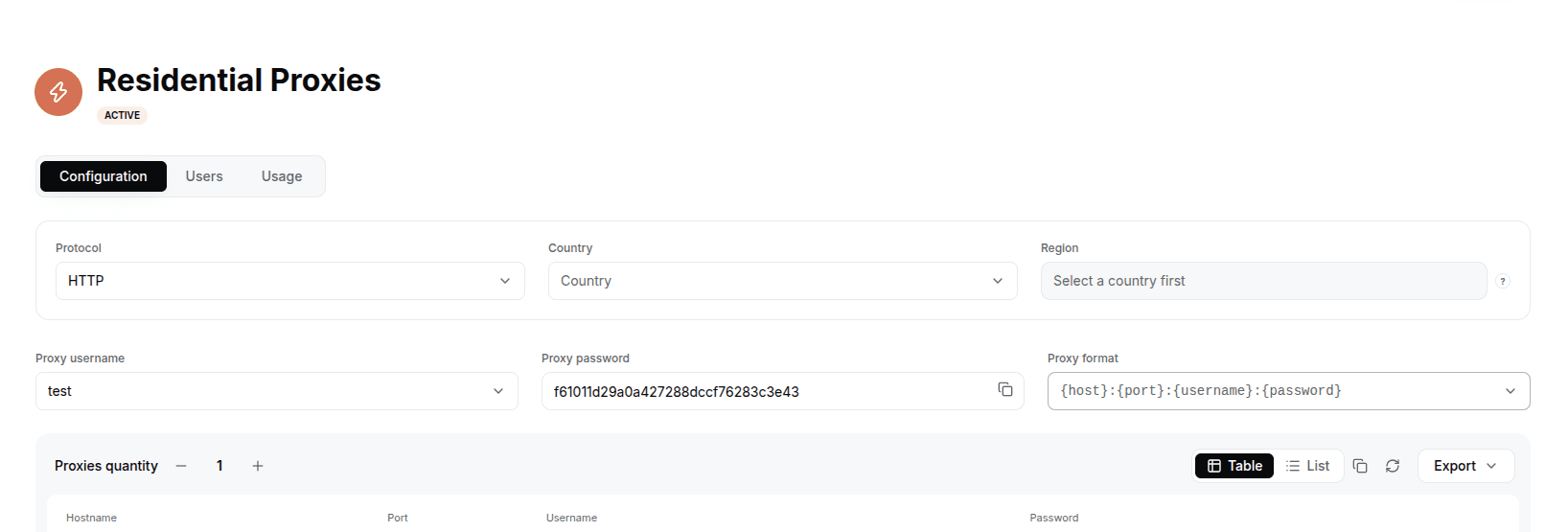
Generate your LightningBytes proxy
In the LightningBytes dashboard, open your Residential or Mobile proxies page and go to the Proxy tab. Choose the protocol (HTTP or SOCKS5), set the country and region if you need targeting, and select the proxy user. Copy the generated endpoint, host:port:username:password by default, or pick a different format from the Proxy format dropdown. Keep the Proxy format dropdown on host:port:username:password and copy each value for the manual MoreLogin setup.
- 4
Setting up proxy in MoreLogin dashboard
Click “Advanced create”, select the HTTP proxy, and set the proxy manually:
New address (IP or host): proxy.lightningbytes.com
Port: 1080
Login: your complete generated username, it already contains any country and session segments (for example customer-lb-user-country-us-sessionid-1234)
Password: your proxy password
Connect MoreLogin to clean, filtered IPs
Residential IPs for scraping e-commerce data at scale, mobile carrier IPs for the hardest targets, on pay-as-you-go or subscription plans with HTTP(S) and SOCKS5.