Shadowrocket proxy with LightningBytes
Set up LightningBytes proxies with Shadowrocket in minutes. Run residential and mobile IPs with full HTTP and SOCKS5 support for fast configuration and consistent performance
What is Shadowrocket?
Shadowrocket is a popular VPN and proxy client for iOS devices that allows users to securely browse the internet, bypass geo-restrictions, and enhance privacy by routing their traffic through encrypted tunnels. It supports various protocols like Shadowsocks, VMess, and SOCKS5, making it versatile for accessing blocked content, improving network security, and optimizing connection speeds. Primarily used in regions with heavy internet censorship, Shadowrocket helps users maintain anonymity and circumvent firewalls. However, its use may violate certain network policies or local laws, depending on the jurisdiction
- Ethically sourced IPs
- Residential & mobile proxies
- 24/7 expert support
How to use LightningBytes proxies with Shadowrocket
Follow the steps below to route Shadowrocket through your LightningBytes residential or mobile proxies.
- 1
Generate and copy your LightningBytes proxy
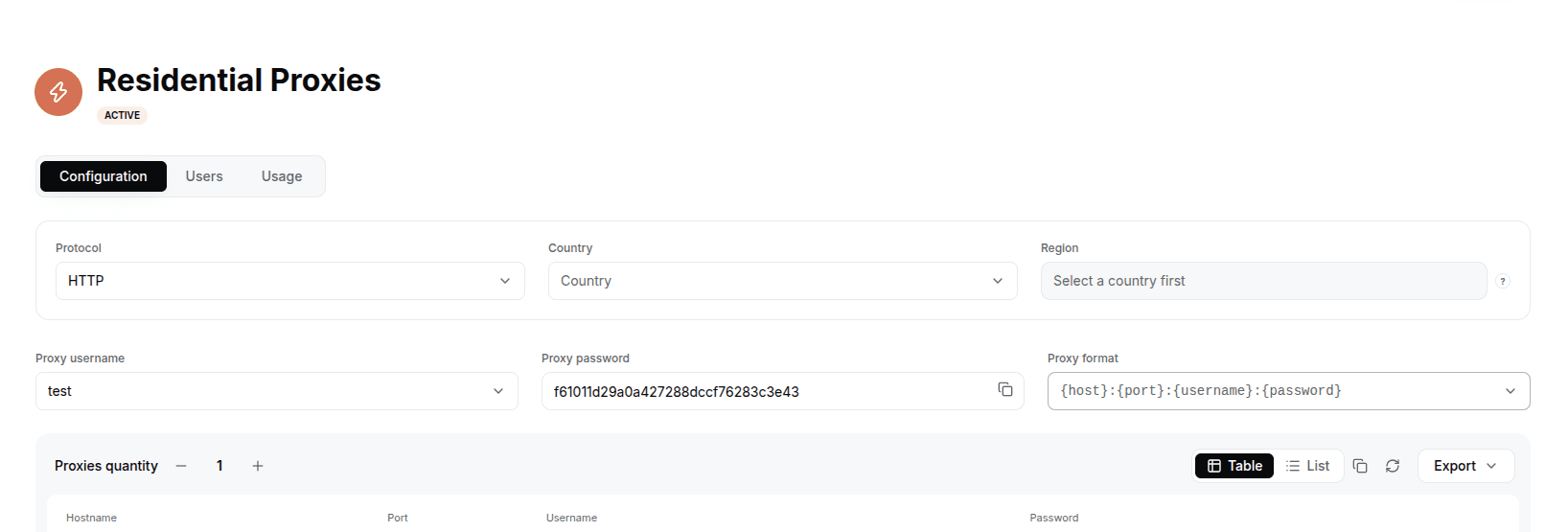
In the LightningBytes dashboard, open your Residential or Mobile proxies page and go to the Proxy tab. Choose your location settings and the SOCKS5 protocol, then copy the proxy username, proxy password, host and port.
- 2
Add your proxy details to Shadowrocket
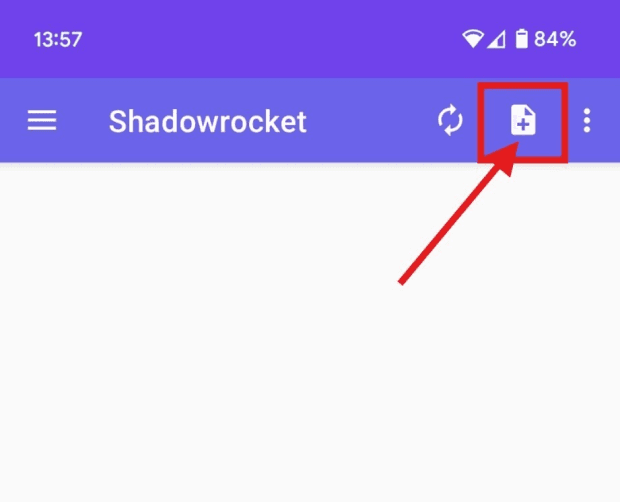
Open Shadowrocket and tap “Add Config” (top-right corner of the main screen)
- 3
In the next menu, select “Type Manually”.
- 4
Choose “SOCKS5” as your proxy type.
- 5
Fill in the proxy details
You will now see the configuration screen. Fill in the following fields with your LightningBytes proxy details:
Remarks: Enter a name for this profile (e.g., LB US Proxy)
- 6
Activate your profile
Your new profile will now appear on the Shadowrocket dashboard. To activate it, tap the paper plane icon at the bottom of the screen.
- 7
Your LightningBytes proxy is now ready to use!
Connect Shadowrocket to clean, filtered IPs
Residential IPs for scraping e-commerce data at scale, mobile carrier IPs for the hardest targets, on pay-as-you-go or subscription plans with HTTP(S) and SOCKS5.